 Web HostingAffordable Canadian web hosting, user-friendly and reliable.
 WordPress HostingFast, reliable WordPress hosting in Canada. Perfect for blogs and businesses.
 SSL CertificatesProtect your website with trusted SSL certificates.
 Email HostingCreate branded email accounts with simple, affordable email hosting.
 Reseller HostingStart your own hosting business with flexible reseller hosting plans.
 Affiliate ProgramJoin our affiliate program and earn commissions by referring customers.
 DomainsFind the perfect domain for your business or personal site with ease.
 Domain TransferTransfer your domain to us and keep your website running without interruption.
 WHOIS LookupQuickly find who owns a domain with our easy WHOIS search tool.
 VPS HostingReliable VPS hosting crafted for performance and peace of mind.
 Managed VPSNo technical skills? Let us manage your VPS for you.
 AI Website BuilderCreate your dream website with the power of AI in seconds.
 Online Shop BuilderLaunch your store quickly with powerful, easy-to-use tools.
 BlogRead our latest articles and stay ahead with expert insights.
 Contact usGet in touch with our team today, we are here to help.
 SupportFind help and guides for all our services.
Are you wondering how to transfer domains in Canada without hassle? Maybe your current registrar charges too much, or their support leaves you hanging.
If you’re in Canada, transferring your .CA, .COM, or other domains can feel tricky—but it doesn’t have to be.
At Truehost, we get it. You want a smooth process, clear pricing, and a registrar that supports your goals.
That’s why we’ve created this guide to show you how to transfer a domain to a trusted Canadian provider like us.
Here’s what you’ll learn:
- Why transferring your domain makes sense
- A step-by-step guide to transfer .CA, .COM, and more
- Benefits of choosing Truehost for your transfer
- Answers to common questions like costs and timelines
Let’s make transferring your domain easy and fast!
Why Transfer Your Domain?
Switching registrars can save you money and stress. Maybe your current provider has hidden fees, or you want better support. Here’s why Canadians are transferring their domains:
- Save Money: Some registrars charge high renewal fees. Truehost offers competitive prices for .CA and .COM domains.
- Better Services: Get faster support, free privacy protection for .CA domains, or easy DNS management.
- Simplify Management: Move all your domains to one place for easier control.
- Boost Your Brand: A .CA domain screams Canadian pride and helps local SEO.
Knowing how to transfer a domain can unlock these benefits. Let’s check if your domain is ready to move.
Is Your Domain Eligible for Transfer?
Before you start, make sure your domain can be transferred. Here are the key checks:
- 60-Day Rule: You can’t transfer a domain within 60 days of registering or a previous transfer. This is an ICANN rule for all domains like .COM or .NET.
- Unlocked Status: Your domain must be “unlocked.” Check this in your current registrar’s control panel.
- .CA Rules: For .CA domains, ensure you meet CIRA’s Canadian presence requirements (e.g., being a Canadian citizen or business).
- EPP Code: You’ll need this code from your current registrar to start the transfer.
Truehost’s portal lets you check eligibility in seconds. Just enter your domain name, and we’ll guide you. Knowing how to transfer a domain starts with these simple checks.
Step-by-Step Guide: How to Transfer a Domain
Ready to move your domain to Truehost? Follow these five easy steps to transfer your .CA, .COM, or other domains. We’ve made how to transfer a domain as simple as possible.
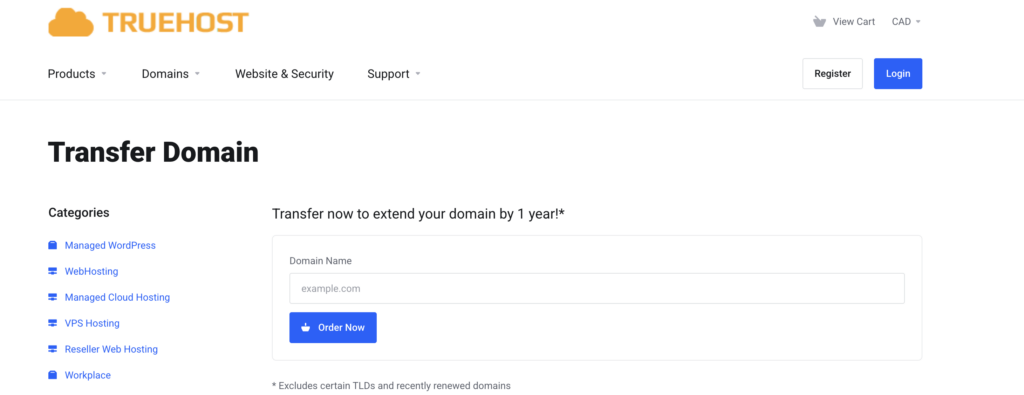
1) Log Into Truehost’s Portal
Start by visiting Truehost Canada. Sign in or create a free account. Look for the “Transfer Domains to Us” button on the dashboard. It’s your gateway to a seamless transfer.
2) Search for Your Domain
Enter your domain name (e.g., yoursite.ca or yoursite.com) in the search bar. Truehost will check if it’s available for transfer. This step confirms your domain is ready to move.
3) Configure Your Options
Add your domain to the cart and enter the EPP code from your current registrar. Choose options like:
- Renewal Period: Extend your domain for 1–10 years.
- Privacy Protection: Free for .CA domains with Truehost!
- DNS Settings: Keep existing settings or update them.
This step customizes how to transfer a domain to fit your needs.
4) Review Your Order
Check the order summary page. Confirm your domain name, EPP code, and selected options. Truehost’s clear layout ensures you don’t miss anything.
5) Complete the Checkout
Pay securely with credit cards, PayPal, or other methods. You’ll get a confirmation email from Truehost and a request from your old registrar to approve the transfer. Once approved, your domain moves to Truehost—easy!
Truehost’s CIRA certification ensures .CA transfers are fast and secure. Now you know how to transfer a domain with confidence.
Why Choose Truehost for Your Domain Transfer?
Truehost makes transferring domains a breeze for Canadians. Here’s why we stand out:
- Affordable Pricing: Transfer your .CA or .COM with no hidden fees. Renewals start at just $15/year for .COM.
- CIRA Certified: We’re an official CIRA registrar, ensuring .CA domains meet all regulations.
- Free Privacy for .CA: Protect your personal info at no extra cost.
- 24/7 Support: Our Canadian-friendly team is here anytime you need help.
- No Downtime: Your website and email stay live during the transfer.
Choosing Truehost simplifies how to transfer a domain while adding value. Ready to switch? Visit Truehost’s transfer page.
What Happens When You Transfer a Domain?
Curious about what goes on behind the scenes? Here’s the deal:
- Registrar Change: Only your domain’s registrar changes. Your website, email, and DNS settings stay the same.
- Email Confirmations: You’ll get emails from Truehost and your old registrar to confirm the transfer.
- No Downtime: Your site stays online if DNS settings are unchanged.
Truehost’s automated system makes how to transfer a domain smooth and worry-free. For .CA domains, our CIRA compliance ensures everything goes perfectly.
Are There Any Limitations?
Not every domain can transfer instantly. Here are some restrictions to know:
- 60-Day Lock: ICANN prevents transfers within 60 days of registration or a prior transfer.
- Expired Domains: If your domain is expired past the grace period (30–45 days), you can’t transfer it until renewed.
- Locked Domains: Your domain must be unlocked at the current registrar.
- .CA Specifics: Ensure you meet CIRA’s Canadian presence rules for .CA domains.
Knowing these limits helps you plan how to transfer a domain without surprises.
How Long Does a Domain Transfer Take?
.COM/.NET/.ORG domain transfers typically complete in up to 5 days with Truehost (and commonly 5–7 days elsewhere). Delays often arise from incorrect EPP codes or delayed email approvals.
Frequently Asked Questions
Got questions? We’ve got answers about how to transfer a domain.
1) What’s an EPP Code, and How Do I Get It?
An EPP code is a unique key to authorize your domain transfer. Request it from your current registrar’s control panel or support team.
2) What If My Transfer Fails?
Check your EPP code and ensure you’ve approved all transfer emails. Truehost’s support team can help troubleshoot.
3) Can I Transfer an Expired .CA Domain?
If it’s within the 30-day grace period, yes. After that, you’ll need to renew it first.
Conclusion
Transferring a domain with Truehost is a clear and simple process. Most .COM, .NET, and .ORG transfers take about five days to complete once approved.
The transfer fee includes one year of renewal, and prices are competitive. Customer feedback also shows that Truehost provides fast and reliable support, which helps make the process smoother.
Ready to move your domain? Start your transfer with Truehost today and enjoy a smooth experience.